 infosave2007
0b071279ac
Every stream used to carry two chunks with an empty choices array: usage,
which the upstream emits BEFORE the stop reason, and a cortiq_cost_usd chunk
the gateway added itself. OpenAI ships the usage chunk only when the request
sets stream_options: {"include_usage": true}, and chat UIs do not set it -
which is why the same tool, in the same Open WebUI, sees neither chunk from
Groq and two from us.

Honour the flag. With no stream_options a stream is now exactly
role -> content... -> tool_calls -> finish_reason -> [DONE], with no
choice-less chunks at all. When usage is requested it ships once, after the
stop reason, with cortiq_cost_usd folded into the same chunk rather than
trailing behind it.

Token accounting, cost and the X-Cortiq-* headers are untouched: those numbers
were never read back off the wire.

Verified: the default stream matches the reference shape byte for byte, the
opt-in stream matches OpenAI's, the official OpenAI SDK reassembles the
streamed tool call, and the full Open WebUI 0.11.0 tool loop still runs the
tool and answers from its result.
Cortiq Gateway
English · Русский


A universal LLM gateway with intelligent routing. One OpenAI-compatible endpoint → automatic model selection from your pool (cheap local + expensive hosted) based on the task type and complexity decided by allaigate / cortiq-router.
In your agent/SDK you only change
base_url— and you get "smart" routing across models. No model-selection logic on the client side.
┌─────────────┐   OpenAI / Anthropic / MCP    ┌──────────────────┐
│   Agent /   │ ─────────────────────────────▶│  Cortiq Gateway  │
│  developer  │   (standard protocol)          │  (this project)  │
└─────────────┘ ◀─────────────────────────────└──────────────────┘
                       response + metadata        │          │
                                                  │ /v1/route│ call LLM
                                                  ▼          ▼
                                         ┌──────────────┐  ┌─────────────────────┐
                                         │ cortiq-router│  │  Model pool         │
                                         │ (task type,  │  │  • local llama.cpp  │
                                         │  complexity) │  │  • ollama / vLLM    │
                                         └──────────────┘  │  • OpenAI / Claude  │
                                                           └─────────────────────┘
✨ Highlights
- Zero-config start.
cortiq-gatewaywith no flags: the config is created for you, a busy port is swapped for a free one, the browser opens on a setup wizard that downloads a ready-made local model and wires it into routing — no TOML, no token, no separate model server. - Fast. Rust/Tokio: sub-millisecond p99 gateway overhead — ~10× the throughput of Portkey and ~47× of LiteLLM in a like-for-like proxy benchmark (details).
- Drop-in OpenAI API + streaming. Point any OpenAI client at the gateway and send
model: "cortiq-auto";stream: trueis fully supported (SSE). - Multi-protocol. OpenAI Chat & Embeddings, Anthropic Messages (in/out, streaming), and an MCP server (
POST /mcp) exposing routing as tools for agent orchestrators. - Intelligent routing.
complexity.tier→ ordered model pool (low → local,high → cloud), with fallback and graceful degradation when the router is down. Plus per-task rules ([routing.tasks]): pin translations to a local model and code to your strongest coder — the complexity chain stays as fallback (docs). - Image & video generation. The Playground drives local text-to-image (Lumina) and text-to-video (MiniMax-H3)
.cmfmodels viacortiq imagine/animate: live progress with ETA, a generation gallery, PNG export, in-browser AVI playback — no ffmpeg anywhere. - Semantic cache. Optional embedding-based cache returns a stored answer for prompts semantically near a previous one — skipping the model call (hit-rate & savings on the dashboard).
- Built-in multilingual admin console. Manage models, routing, protocols, keys and secrets from a web UI — no hand-editing TOML, no restart (changes are hot-reloaded). Available in 7 languages (en, ru, de, fr, es, zh, tr) with light/dark themes.
- Live analytics. Per-request stats (tokens, cost, latency, success rate, failovers), time-series charts, breakdowns by model/tier/task, and a Prometheus
GET /metricsendpoint. - Playground. Send a prompt through the live pipeline and inspect the routing decision.
- Single self-contained binary. The SPA is embedded into the Rust binary — nothing extra to deploy.
- Secrets stay in the gateway. Agents hold only a virtual gateway key; provider keys live in the gateway and never leak to clients.
📦 Install
# Docker (GitHub Container Registry)
docker run -p 9000:9000 -e CORTIQ_ADMIN_TOKEN=secret \
  -v "$PWD/config:/app/config" -v cortiq-data:/app/data \
  ghcr.io/infosave2007/cortiq-gateway:latest
# → admin console at http://localhost:9000/admin

# from crates.io
cargo install cortiq-gateway
cortiq-gateway          # no flags, no config file, no token — see Quick start

# or build from source
git clone https://github.com/infosave2007/cortiq-gateway
cd cortiq-gateway
cargo build --release   # ./target/release/cortiq-gateway
The image ships a default config and runs out of the box; mount /app/config (with a
gateway.toml) to use your own. Downloaded models and stats live in /app/data — mount
a volume there so they survive container recreates (a host folder works too, e.g.
-v "$PWD/models:/app/data/models"). Tags: :latest, :X.Y.Z, :edge
(linux/amd64 + arm64).
Docker Compose — gateway + a local Ollama model in one command:
docker compose up -d
docker compose exec ollama ollama pull qwen2.5:0.5b   # pull a model once
# → OpenAI API at http://localhost:9000/v1 · admin at /admin (token: change-me)
See docker-compose.yml. For smart routing, set CORTIQ_ROUTER_KEY
and add a [router] (see docs/ROUTER.md).
Deploying for a team or an office (systemd/launchd/Windows service, TLS reverse proxy, API keys with rate limits and monthly budgets, backups): docs/DEPLOY.md.
🖥️ Admin console
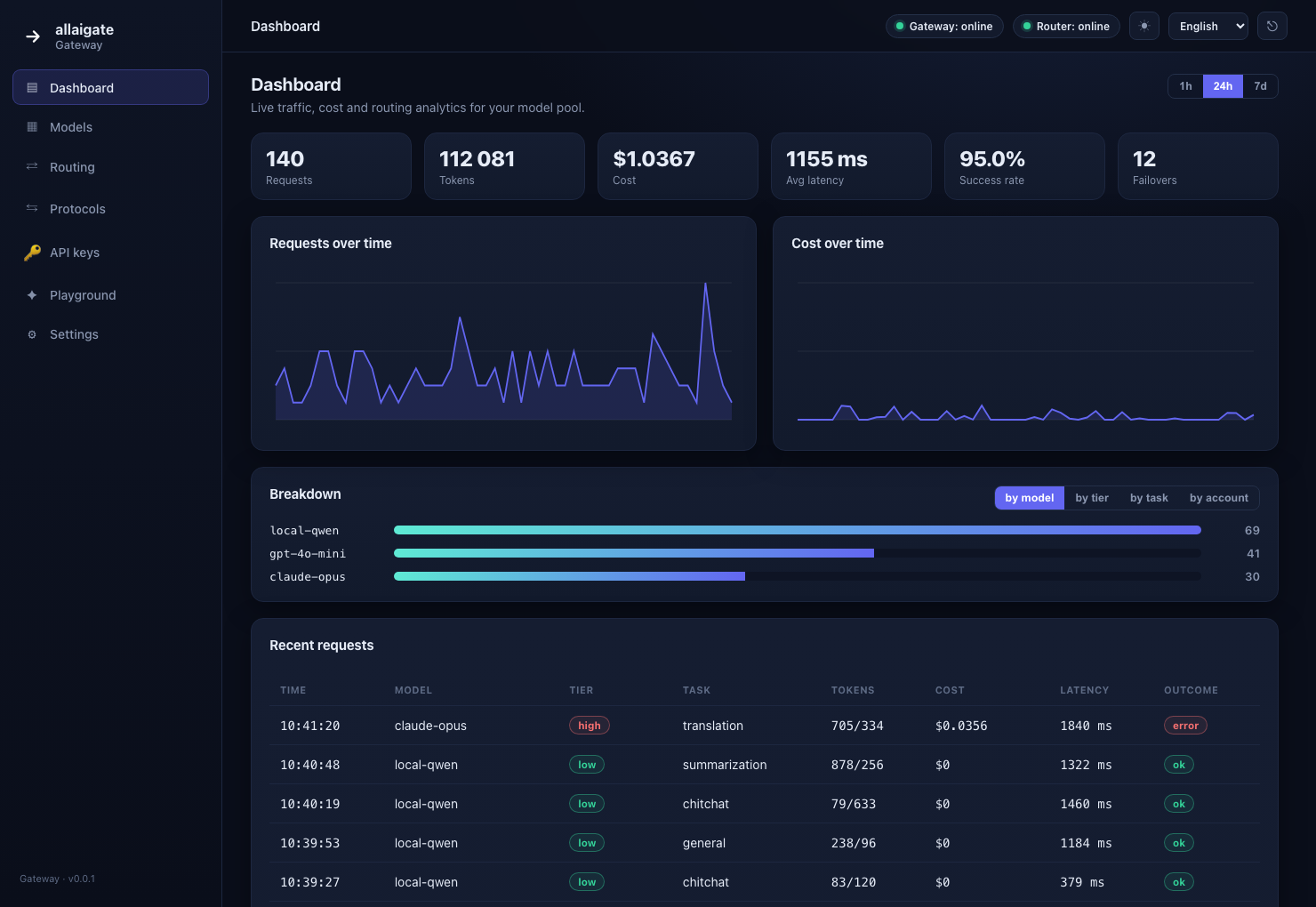
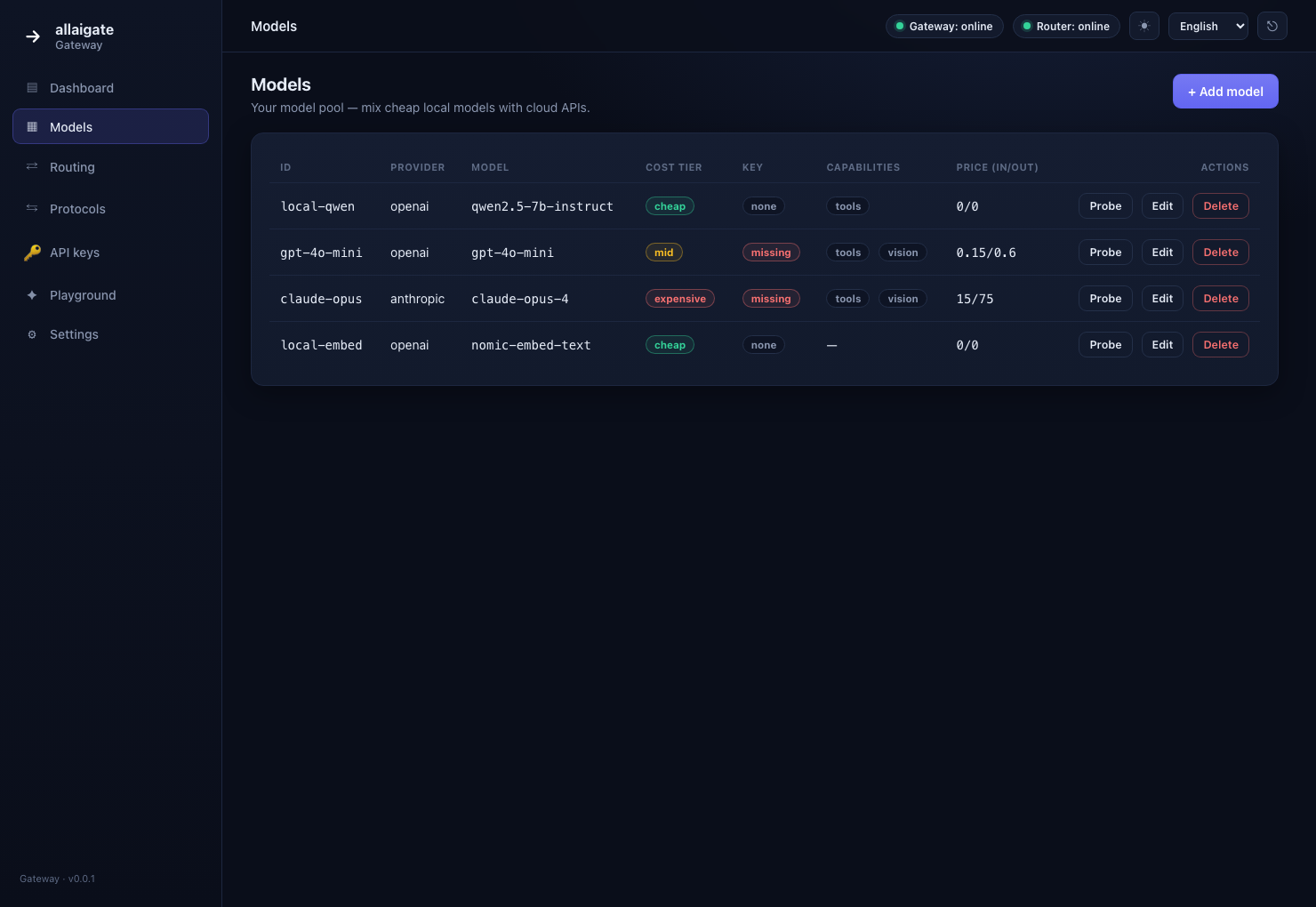
The gateway ships with an embedded web console at /admin:
| Models | Routing |
|---|---|
 |
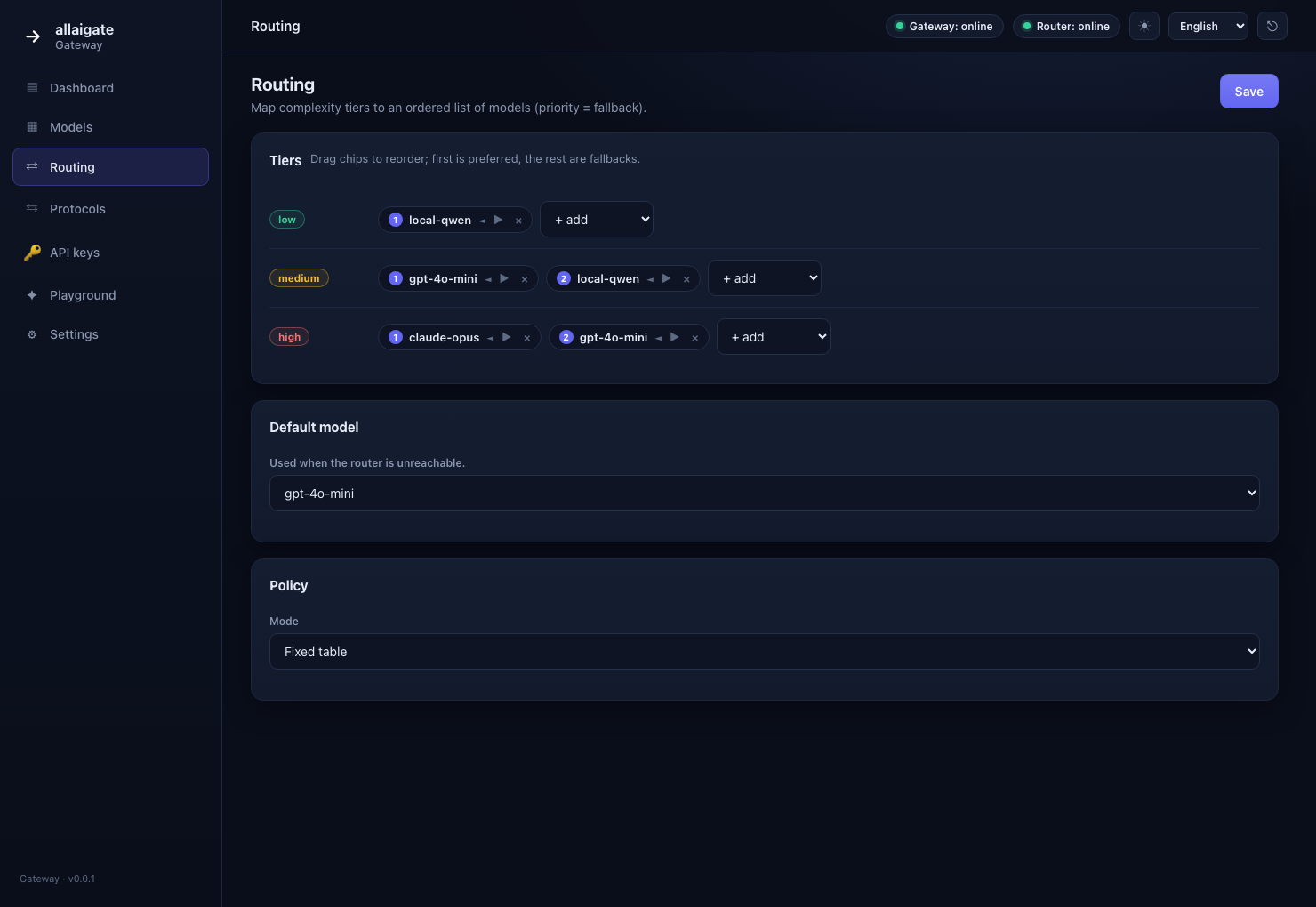 |
| add/edit/probe models, manage provider keys | visual tier editor (ordered, reorderable) |
| Playground |
|---|
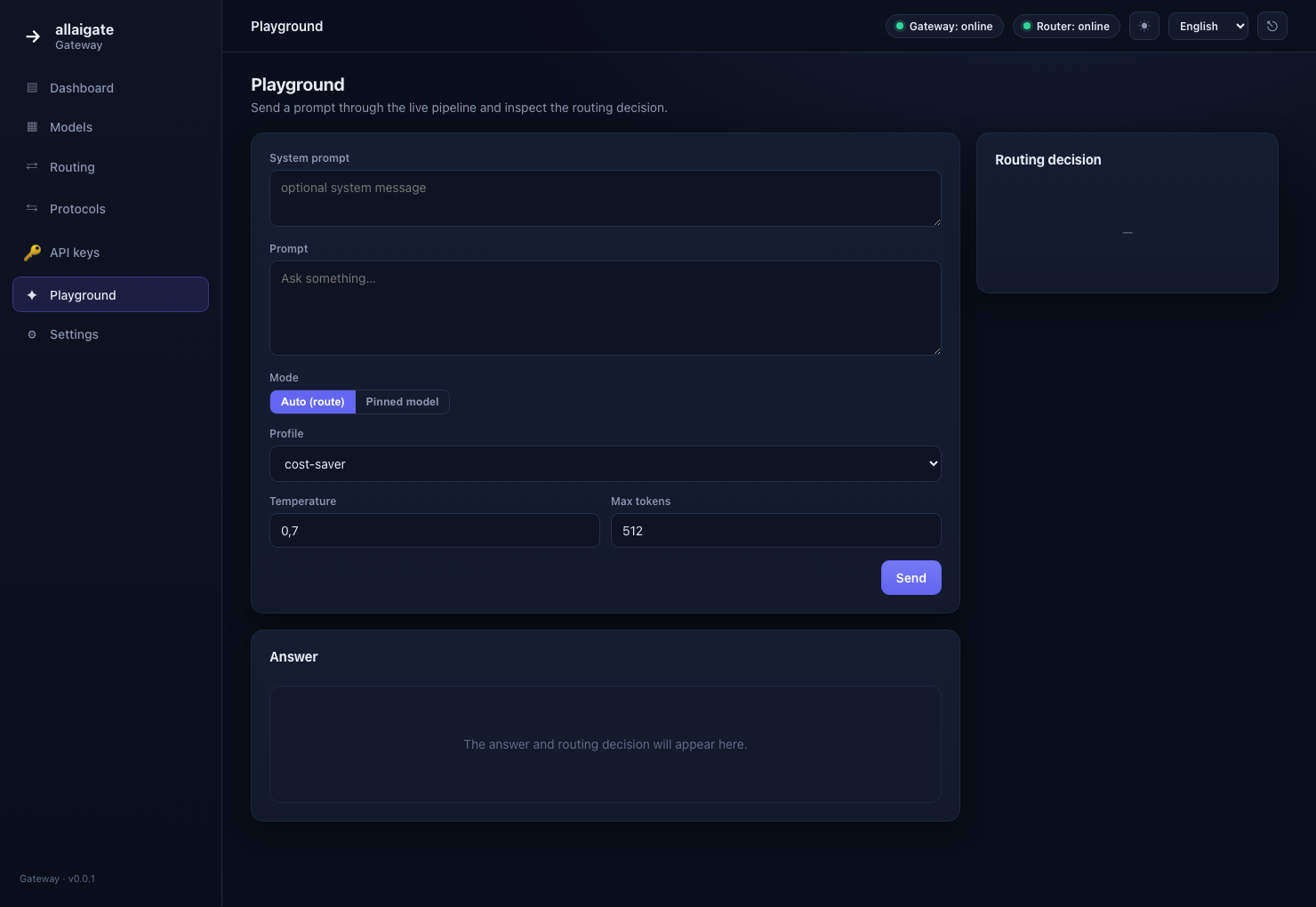 |
| test the live pipeline and see the routing decision |
The console is open by default — no token needed. To protect it, set any one of
--admin-token <TOKEN>, [admin].token, or [admin].token_env:
cortiq-gateway --admin-token <YOUR_TOKEN>
# open  http://localhost:9000/admin?token=<YOUR_TOKEN>
Once a token is set, every /admin/api/* endpoint requires it as a Bearer token. Secret
values are never returned by the API (only their presence: store / env / missing).
🚀 Quick start
cortiq-gateway
That is the whole command. On first run the gateway:
- creates its config —
config/gateway.tomlwhen started from a checkout, otherwise~/.cortiq-gateway/gateway.toml(override with$CORTIQ_GATEWAY_HOMEor--config); - picks a free port if 9000 is taken, and writes the choice back to the config;
- opens your browser on the setup wizard at
/admin#/onboarding.
The wizard takes you from nothing to a working local model:
| Step | What happens |
|---|---|
| Language | 7 languages; changeable later from the header |
| Ready-made models | the infosave .cmf models, read live from HuggingFace — pick a quantization and watch the real download progress |
| Any HF model | search HuggingFace and auto-convert to .cmf |
| Finish | every completed download is connected as a local model, its cortiq serve is started, routing.default points at it, and you land in the Playground |
No TOML editing, no separate "register" step, no manually started model server. Prefer to skip the wizard? Add models from the console (Models, Import model) or hand-write the config — both still work, and changes hot-reload without a restart.
# explicit config / port / no browser — all optional
cortiq-gateway --config config/gateway.toml --no-browser --no-port-search
For smart routing across a pool, point [router] at the hosted allaigate router or a local
cortiq-router (see docs/ROUTER.md). Without a router the gateway degrades
gracefully to the default model, so a local-only setup works out of the box.
Now any OpenAI client works through the gateway:
from openai import OpenAI
client = OpenAI(base_url="http://localhost:9000/v1", api_key="sk-gw-...")

resp = client.chat.completions.create(
    model="cortiq-auto",                       # ← magic model = "choose for me"
    messages=[{"role": "user", "content": "Solve x^2 - 5x + 6 = 0"}],
)
print(resp.choices[0].message.content)
# response headers show what the gateway picked:
#   X-Cortiq-Task-Label: math
#   X-Cortiq-Complexity-Tier: low
#   X-Cortiq-Selected-Model: local-qwen
model: "cortiq-auto" enables routing. Any real model name from the config
("gpt-4o-mini", "local-qwen") is a direct passthrough, without routing.
Using the hosted allaigate router? It is the default:
url = "https://router.allaigate.com"withverify_tls = true. Settaxonomy_id = "data-assistant"and acortiq_…key inCORTIQ_ROUTER_KEY. On hard prompts the router escalates to an oracle (~10 s), so settimeout_ms = 12000+— otherwise the gateway gracefully degrades to the default model.
🧭 The router (allaigate)
cortiq-auto routing is powered by a semantic router — the classifier that reads a
prompt and returns its task type + complexity. Use the hosted
allaigate router (~94% accuracy on close task types,
patent-pending, privacy-first) or self-host cortiq-router. Pinned models need no router.
🎉 Launch promo: grab a $1 Starter key with code
LAUNCH1at api.allaigate.com (limited activations).
Setup, pricing, API contract and how to verify accuracy: docs/ROUTER.md.
Request flow
- Client →
POST /v1/chat/completions(or Anthropic/MCP) withmodel: "cortiq-auto". - The gateway extracts the text to route on (strategy is configurable, see docs/ROUTING.md).
- Gateway →
cortiq-router /v1/route→ getstask_label+complexity.tier. - Gateway selects a model from the pool via the routing table (with a fallback order).
- Gateway → the selected model's provider (translating the protocol if needed), returns the response.
- Gateway attaches routing metadata in headers/
usageand records cost & statistics.
Details — docs/ARCHITECTURE.md.
Supported protocols (inbound)
Each adapter is toggled in the config — take only what you need.
| Protocol | Endpoint | Status |
|---|---|---|
| OpenAI Chat Completions | POST /v1/chat/completions |
✅ implemented (+ streaming) |
| OpenAI Embeddings | POST /v1/embeddings |
✅ implemented |
| Anthropic Messages | POST /v1/messages |
✅ implemented (+ streaming) |
| MCP (Model Context Protocol) | POST /mcp (JSON-RPC) |
✅ implemented |
| OpenAI Completions (legacy) | POST /v1/completions |
✅ implemented (+ streaming) |
| OpenAI Models | GET /v1/models |
✅ implemented |
| Native passthrough | POST /route |
✅ implemented |
Supported providers (outbound)
| Provider | Covers |
|---|---|
openai (OpenAI-compatible) |
OpenAI, OpenRouter, Together, Groq, vLLM, llama.cpp server, LM Studio, Ollama (/v1) |
anthropic |
Claude Messages API (+ streaming) |
ollama |
native Ollama API |
http |
arbitrary HTTP endpoint (custom adapter) |
Most local servers already expose an OpenAI-compatible API — so the openai
adapter makes the gateway universal with almost no effort.
Configuration
listen = "0.0.0.0:9000"

[router]
url = "http://localhost:8080"
api_key_env = "CORTIQ_ROUTER_KEY"

[[models]]
id        = "local-qwen"
provider  = "openai"
base_url  = "http://localhost:8000/v1"
model     = "qwen2.5-7b-instruct"
cost_tier = "cheap"

[[models]]
id          = "claude-opus"
provider    = "anthropic"
base_url    = "https://api.anthropic.com"
model       = "claude-opus-4"
api_key_env = "ANTHROPIC_API_KEY"
cost_tier   = "expensive"

[routing]
low     = ["local-qwen"]
high    = ["claude-opus", "local-qwen"]
default = "local-qwen"
Full example — config/gateway.example.toml. Routing & cost-aware selection — docs/ROUTING.md. Everything in the config is also editable from the admin console at runtime.
Cross-standards (like grown-up APIs)
- Auth:
Authorization: Bearer sk-gw-...(virtual gateway keys). - Errors: OpenAI-compatible
{"error": {...}}envelope — parsed natively by SDKs. - Routing metadata:
X-Cortiq-*headers on every response. - Cost accounting: token usage + USD cost and the selected model.
- Observability:
GET /metrics(Prometheus),GET /healthz,GET /readyz.
Details — docs/PROTOCOLS.md.
⚡ Performance & accuracy
Latency — gateway overhead proxying the same instant backend, ab -k -r -c 20 -n 5000:
| Gateway | req/s | p50 | p99 |
|---|---|---|---|
| Cortiq Gateway (Rust) | ~57,300 | 0 ms | 1 ms |
| Portkey (Node) | ~5,800 | 3 ms | 9 ms |
| LiteLLM (Python, 4 workers) | ~1,200 | 9 ms | 59 ms |
Accuracy — task-type routing on natural-language prompts (7 task types). LiteLLM/Portkey have no semantic task router; a keyword heuristic is the DIY stand-in:
| Classifier | Accuracy |
|---|---|
| allaigate semantic router | 100% (37/37) |
| keyword heuristic (no classifier) | 32% (12/37) |
Methodology, caveats and a reproducible harness: BENCHMARKS.md
(bash bench/run.sh, python3 bench/accuracy.py). Numbers vary; the gaps are the point.
Build & test
cargo build --release      # single self-contained binary (SPA embedded)
cargo test                 # config round-trip, routing validation
✅ Tested
| Area | How it's verified | Status |
|---|---|---|
| Config load/save round-trip, routing validation | cargo test (unit) |
✅ |
| Build · format · lint | CI: cargo build / fmt --check / clippy -D warnings on Linux · macOS · Windows |
✅ |
| OpenAI Chat + SSE streaming | integration (mock upstream) | ✅ |
| Anthropic Messages — in/out, streaming + non-streaming | integration (mock) | ✅ |
Embeddings (POST /v1/embeddings) |
integration (mock) | ✅ |
| Semantic cache — hit / miss / savings | integration (mock) | ✅ |
MCP — initialize / tools/list / tools/call |
integration (mock) | ✅ |
Models · Completions · native POST /route |
integration (mock) | ✅ |
| Routing — auto / pinned / failover / degrade | integration (mock and live allaigate router) | ✅ |
| Hot config reload (no restart) | integration | ✅ |
| Latency benchmark vs LiteLLM / Portkey | bench/run.sh (Apache Bench) — see BENCHMARKS.md |
✅ |
| Task-type routing accuracy | bench/accuracy.py — live router 100% vs keyword heuristic 32% |
✅ |
Status
Implemented: OpenAI Chat Completions with SSE streaming, Anthropic provider +
inbound /v1/messages (streaming), embeddings, a semantic cache, MCP server,
routing with fallback & graceful degradation, cost/token accounting, the embedded
multilingual admin console with hot config reload, statistics and Prometheus
GET /metrics. Planned: per-account routing tables, router feedback loop. See the roadmap in
docs/ARCHITECTURE.md.
Contributions welcome — see CONTRIBUTING.md.
License
Apache-2.0 — see LICENSE.